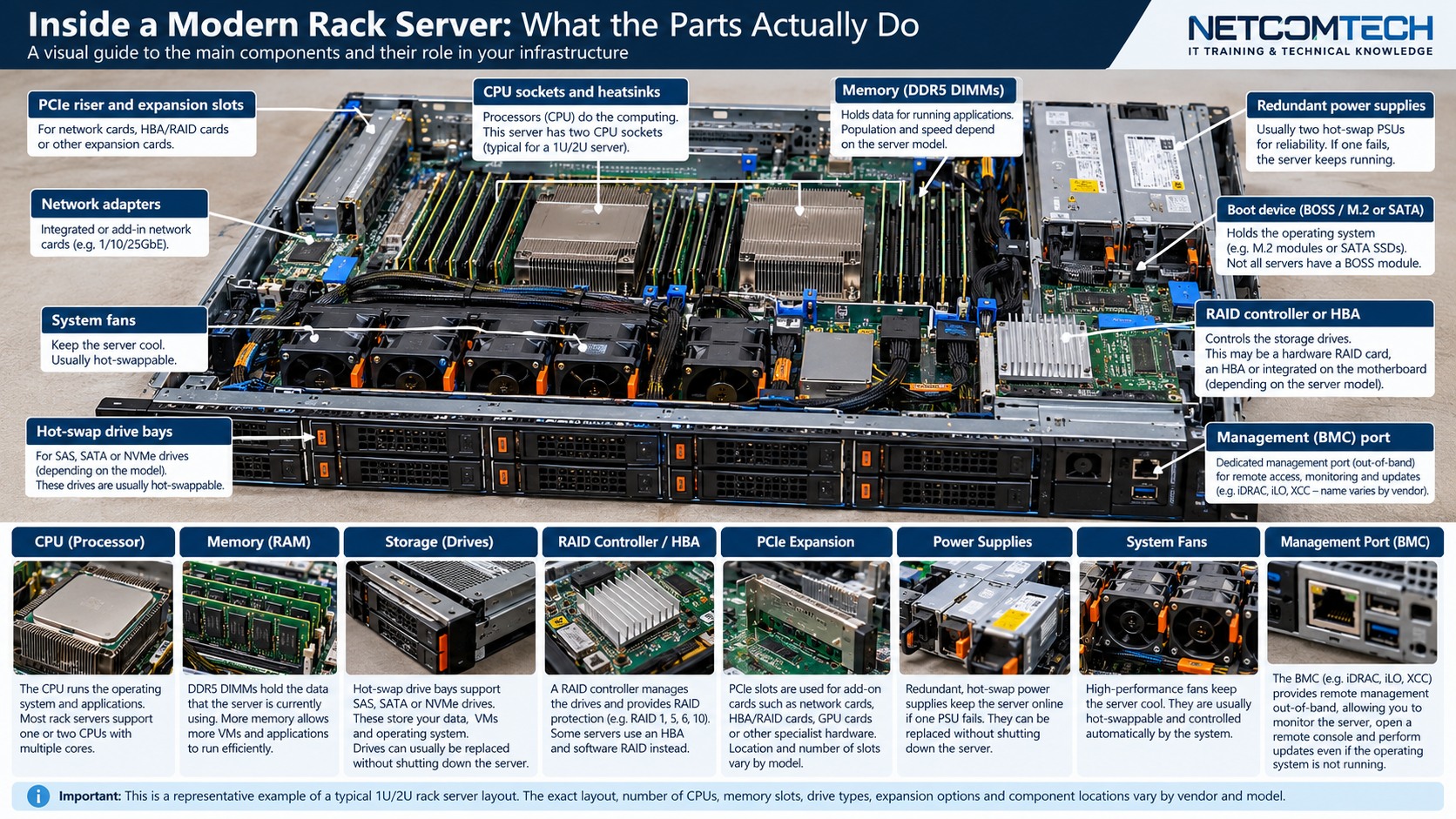
1. Understand the design before touching the hardware
Understand why total gigabytes are only one part of a server memory design, and how CPU ownership, channels, population rules and NUMA affect a valid upgrade.
The practical rule is to separate what is physically possible from what is supported, what is supported from what is well designed, and what is well designed from what has actually been tested. Product names and connector shapes are useful clues, but they are not substitutes for the exact platform documentation.
Server Warehouse category links on this page identify relevant hardware families. Compatibility with a specific server, switch, storage platform, UPS, camera or cabling system must still be verified against the exact model and application.
2. Technical principles that matter
Memory belongs to a platform, not only a DDR generation
A DDR5 RDIMM that physically fits is not automatically supported. Server generation, CPU family, DIMM type, capacity, rank, width, firmware and the vendor population matrix all participate in compatibility.
Channels determine bandwidth
Modern server CPUs expose multiple memory channels. Filling channels evenly can matter as much as raw capacity because an unbalanced population can leave available memory bandwidth unused.
CPU ownership matters
In multi-socket systems, DIMM slots are associated with a particular processor. A slot can be present on the board but unavailable when the corresponding CPU is not installed.
NUMA changes locality
A processor normally accesses memory attached to its own socket with lower locality cost than memory attached to another socket. Hypervisors and operating systems therefore expose NUMA topology to workloads.
Rated DIMM speed is not guaranteed operating speed
The actual memory transfer rate can be limited by the processor, platform, DIMM population and supported operating mode. Read the server manual rather than quoting the label speed as the installed speed.
3. Field workflow
Use a repeatable process so that the result can be explained and handed over to another technician. Record the starting state before changing anything.
- Record exact server model, service tag or serial number and installed CPU count.
- Export the current memory inventory including slot, capacity, type and speed.
- Open the manufacturer population table for that exact platform and processor generation.
- Design the target capacity around balanced channels before choosing module count.
- Check whether the upgrade changes operating speed or supported memory mode.
- Install with power state and ESD procedure appropriate to the platform, then validate BIOS and OS inventory.
Where the manufacturer supplies a model-specific installation, population, compatibility or service procedure, that procedure takes priority over a generic field rule. The purpose of this workflow is to make sure the correct documentation is used at the correct point.
4. Worked field scenario
A dual-socket server needs more RAM for virtual machines. Buying four large DIMMs may achieve the requested capacity but still produce a poor layout if all modules are attached to one processor or only a small subset of channels. The better design starts with the population table, spreads supported modules across the required channels and then confirms the hypervisor sees the expected NUMA nodes.
The important lesson is not the brand in the example. It is the reasoning chain: identify the requirement, trace the complete path, find the limiting or unsupported element, correct that element, and then prove the result with measurements or platform health evidence.
5. Fault-finding decision table
| What you see | Where to investigate next |
|---|---|
| Server does not POST after upgrade | Return to the exact population rules first. Check DIMM type, capacity mix, slot order and CPU ownership before assuming the new DIMM is faulty. |
| Capacity is correct but performance falls | Check channel balance, NUMA locality, operating speed and whether the workload moved across NUMA nodes. |
| DIMM runs slower than its label | Compare CPU-supported speed, DIMMs per channel and the platform's supported memory matrix. |
| Only one CPU's slots work | Confirm the second processor is installed, seated and supported, and that its memory channels are populated according to the manual. |
Change one variable at a time where practical. A fault that disappears after five simultaneous changes teaches very little and can return later because the real cause was never isolated.
6. What correct should look like
- BIOS reports the intended total capacity
- Every installed DIMM is healthy with no predictive errors
- Channel population matches the platform guide
- Operating speed is recorded
- OS or hypervisor NUMA topology is documented
- A memory stress or workload validation completes without hardware errors
Acceptance is evidence, not confidence. Save configuration, test results, screenshots, logs, photographs, serial numbers or drawings appropriate to the job so that the next person can establish the known-good state.