What this chapter should help you do
Understand the design choices, recognise the information that must be checked on the actual product, avoid common selection mistakes, and produce a requirement that can be matched to suitable hardware.
PRODUCT EDUCATIONFIELD PRACTICEMODEL-SPECIFIC CHECKS1. U height is only vertical capacity
One rack unit is a standard vertical mounting increment, but a cabinet with enough U space can still be unusable if it is too shallow, too narrow for cable management or unsuitable for the equipment load.
2. Depth is often the first server check
Measure chassis depth, rail travel, front cable/door clearance and rear power/cable clearance. Sliding rails can require more usable depth than the server chassis alone suggests.
3. Standing, wall-mount and open racks
Standing cabinets suit larger equipment and server-room installations. Wall cabinets are often used for network equipment and shallow devices. Open racks improve access and airflow but provide less physical enclosure. Choose by equipment and environment.
4. 19-inch mounting does not mean universal fit
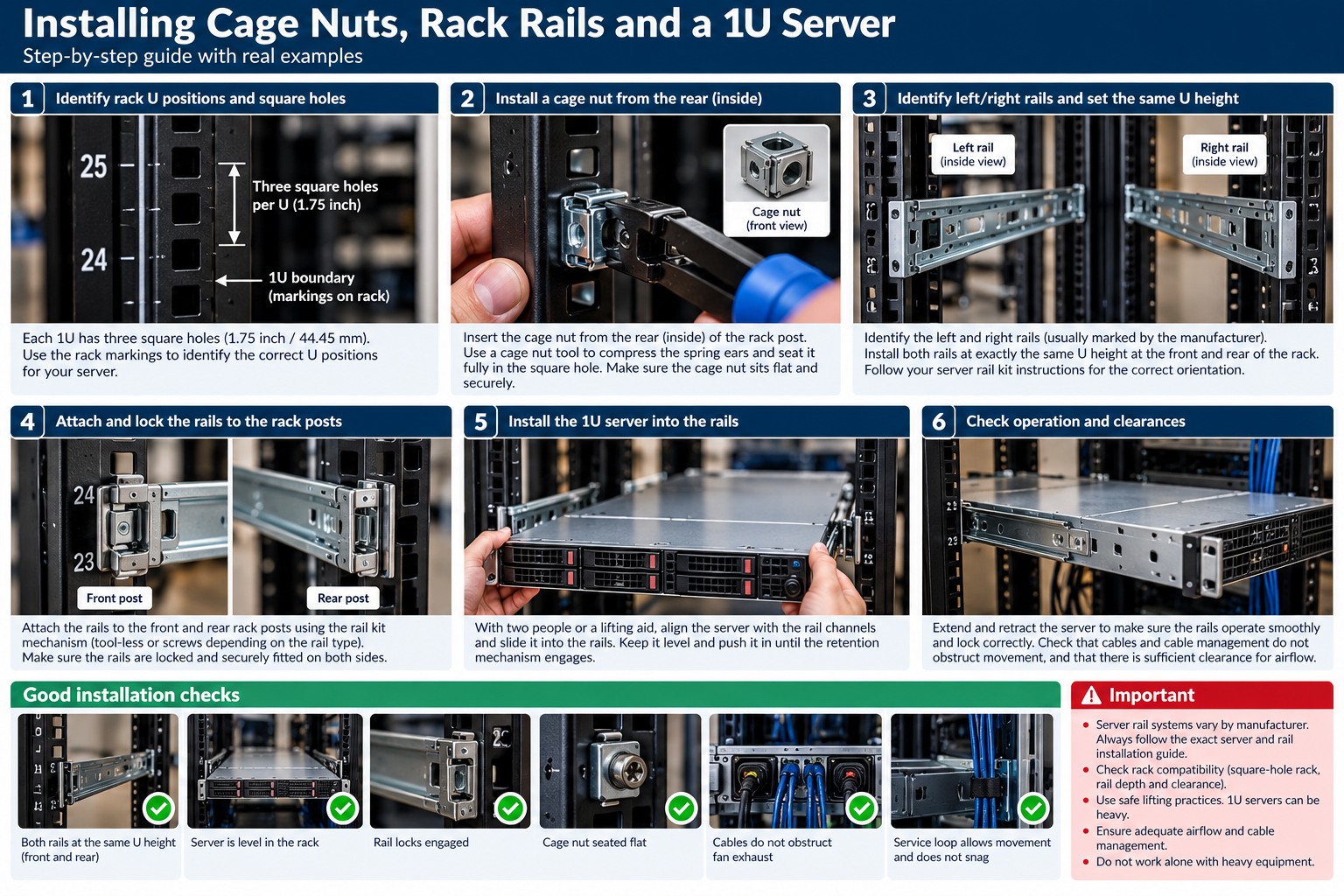
Many devices use 19-inch rack mounting, but rail type, hole pattern, depth and mounting kit still matter. Some rails are tool-less; others use cage nuts or threaded hardware.
5. Static and dynamic load
Check cabinet load rating and floor/support capability. Heavy UPS units and dense servers should be placed with centre of gravity and installation safety in mind.
6. Door and airflow design
Perforated doors support front-to-rear airflow when the equipment is designed that way. Solid or poorly ventilated doors can create restrictions. Cabinet fans are not a substitute for understanding equipment airflow.
7. Service clearance
Plan enough space to remove power supplies, drives, rails, cable-management arms and side panels. A cabinet that technically contains the equipment but cannot be serviced is poorly designed.
8. Cabinet selection worksheet
- Record the exact model and firmware/software level.
- Verify physical interfaces and supported media.
- Confirm power, cooling and environmental requirements.
- Test the intended workload, not only basic connectivity.
- Record baseline measurements and configuration.
- Label and document the installation for future fault finding.
Field application and acceptance
This section turns the technical concepts above into a repeatable procurement, installation and handover process.
Field build workflow
Create a rack elevation before installing equipment. Confirm cabinet dimensions, rail compatibility, equipment weight, airflow direction, cable-entry points, PDU positions and service clearances. Install heavy items safely, then build power, network and patching paths so each device can be serviced without disturbing unrelated equipment.
Questions to answer before ordering
- What is the deepest device including rails and rear cabling?
- How many U are required now and after growth?
- What total static load and heavy-device positions are expected?
- Which rail kits, shelves and cage-nut hardware are required?
- Where will vertical and horizontal cable managers sit?
- How many PDU outlets and independent power paths are required?
- How will intake and exhaust air move through the rack?
Fault-finding method
For thermal or service problems, inspect the physical rack before changing software. Look for blocked intakes, recirculation, missing blanks, dense cable bundles, failed fans, hot UPS exhaust and equipment installed against its intended airflow. For intermittent cabling faults, check tension, bend, connector strain and whether service loops are being crushed by doors or equipment.
Operational documentation
Keep a rack elevation showing U positions, device names, serials, switch/patch-panel ports, PDU A/B connections and cable IDs. Photograph the completed front and rear of the rack after commissioning and after major changes.
What correct looks like
The rack is stable, equipment is supported by the correct rails or shelves, heavy items are sensibly positioned, airflow paths are clear, cables are traceable, power feeds are labelled, unused openings are managed as required and routine components can be replaced without dismantling unrelated infrastructure.
RELATED HARDWARE
Apply the lesson to Server Warehouse
These links identify product families relevant to the lesson. They are educational relationships, not automatic compatibility claims for a specific SKU.
Technical references
Manufacturer documentation, product datasheets and project requirements remain the final authority for model-specific limits, compatibility, installation and safety.