1. Understand the design before touching the hardware
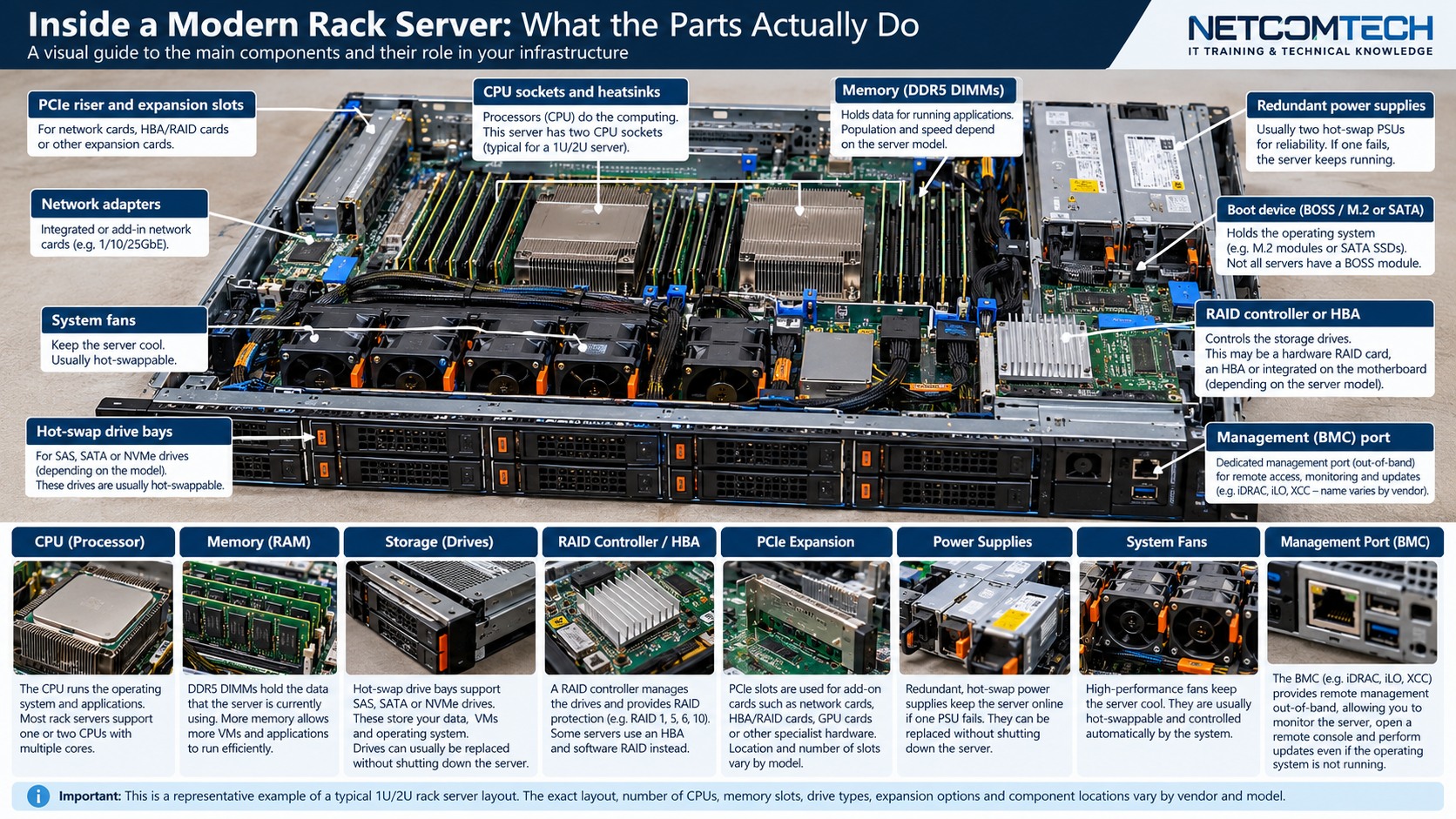
Plan NIC, HBA, RAID, GPU and accelerator expansion by tracing slot mechanics, electrical lanes, CPU ownership, riser options, power and airflow.
The practical rule is to separate what is physically possible from what is supported, what is supported from what is well designed, and what is well designed from what has actually been tested. Product names and connector shapes are useful clues, but they are not substitutes for the exact platform documentation.
Server Warehouse category links on this page identify relevant hardware families. Compatibility with a specific server, switch, storage platform, UPS, camera or cabling system must still be verified against the exact model and application.
2. Technical principles that matter
A full-length slot is not necessarily electrically x16
Mechanical slot size and electrical lane width are separate facts. Read the platform slot table.
Riser configuration can change available slots
Many rack servers use selectable riser assemblies. Two servers with the same chassis model can expose different slots because they were ordered with different risers.
Some slots belong to a particular CPU
Adding a second processor can enable additional PCIe lanes or slots. A card placed in a CPU2-owned slot may not enumerate in a single-CPU configuration.
Bandwidth is shared in some topologies
PCIe switches, bifurcation and shared root complexes can affect the path available to multiple devices.
Power and cooling are part of expansion compatibility
High-power adapters and accelerators can require auxiliary power, specific fan kits, heatsinks, blanking or thermal restrictions.
3. Field workflow
Use a repeatable process so that the result can be explained and handed over to another technician. Record the starting state before changing anything.
- Inventory every fitted adapter and riser.
- Record slot number, mechanical size, electrical width, PCIe generation and CPU ownership.
- Calculate which new cards require maximum lane width and which can tolerate a narrower link.
- Check card length, height, bracket and auxiliary power.
- Review thermal restrictions and supported slot priority.
- After installation, verify negotiated PCIe width/speed, device firmware, driver and health.
Where the manufacturer supplies a model-specific installation, population, compatibility or service procedure, that procedure takes priority over a generic field rule. The purpose of this workflow is to make sure the correct documentation is used at the correct point.
4. Worked field scenario
A 25GbE NIC and an HBA both need to be added to a 1U server. The chassis has open-looking slots, but one is electrically narrower and another is tied to CPU2. The correct bill of materials may require a different riser or second CPU configuration, not merely two adapter cards.
The important lesson is not the brand in the example. It is the reasoning chain: identify the requirement, trace the complete path, find the limiting or unsupported element, correct that element, and then prove the result with measurements or platform health evidence.
5. Fault-finding decision table
| What you see | Where to investigate next |
|---|---|
| Card is not detected | Check CPU ownership, riser presence, slot enablement, seating and firmware support. |
| Card works but performance is low | Check negotiated lane width/generation and whether the card is installed in a constrained slot. |
| Fans run at unexpectedly high speed | Check whether the platform applies a thermal response to the installed card or requires a supported thermal profile. |
| Second adapter cannot be fitted physically | Recheck riser geometry, card length/height and adjacent-slot clearance. |
Change one variable at a time where practical. A fault that disappears after five simultaneous changes teaches very little and can return later because the real cause was never isolated.
6. What correct should look like
- All adapters enumerate without hardware errors
- Negotiated PCIe width and generation meet design intent
- Firmware and drivers are recorded
- No unsupported thermal warnings
- Cable routing does not obstruct airflow
- Final slot map is included in handover documentation
Acceptance is evidence, not confidence. Save configuration, test results, screenshots, logs, photographs, serial numbers or drawings appropriate to the job so that the next person can establish the known-good state.