What this chapter should help you do
Understand the design choices, recognise the information that must be checked on the actual product, avoid common selection mistakes, and produce a requirement that can be matched to suitable hardware.
PRODUCT EDUCATIONFIELD PRACTICEMODEL-SPECIFIC CHECKS1. Host compatibility first
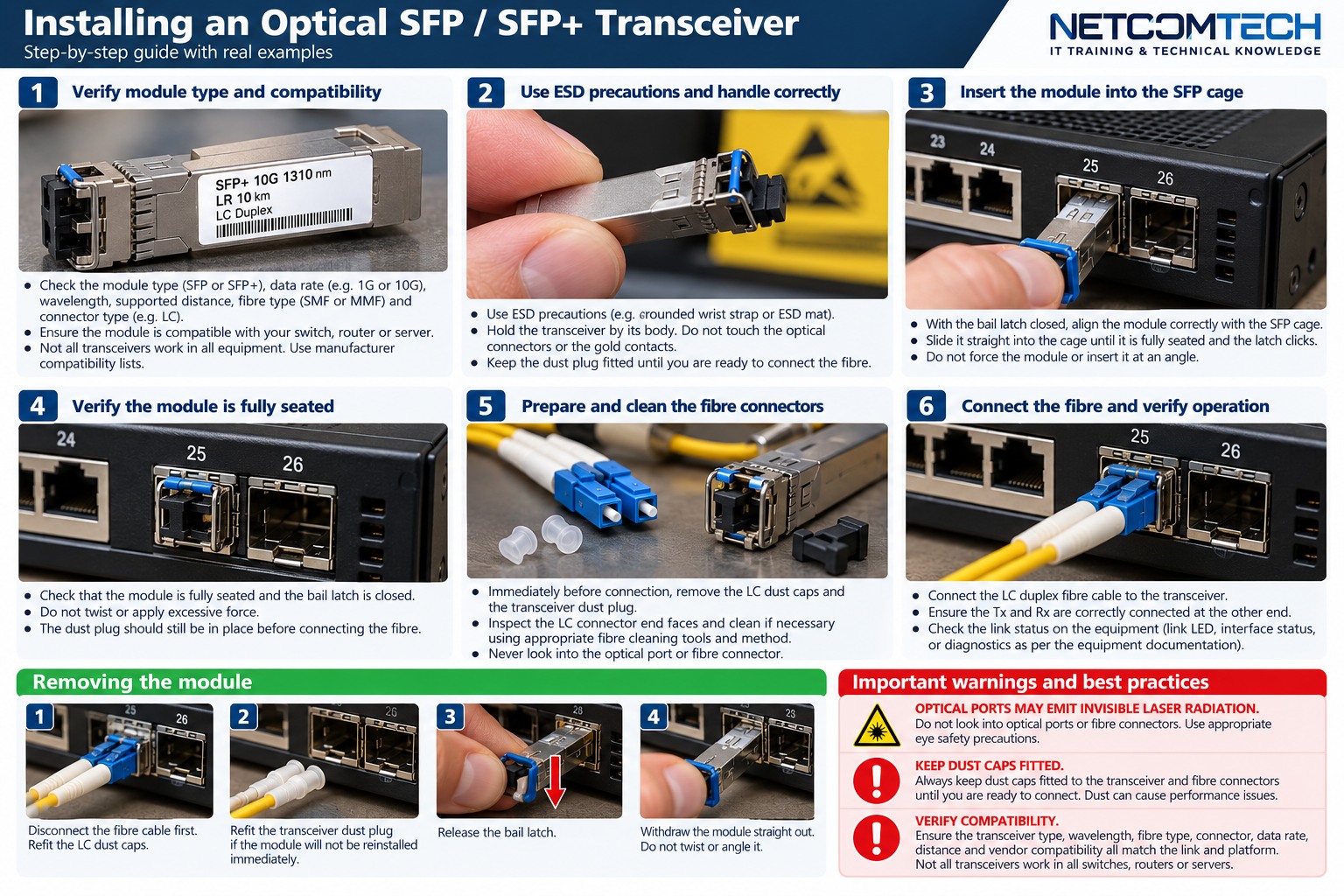
Identify the exact switch, router or NIC port. Confirm supported module types and speeds. Vendor restrictions and coding can apply on some platforms.
2. Speed and module family
Gigabit SFP, 10G SFP+ and 25G SFP28 are different link classes. Some host ports support multiple speeds, but support must be verified rather than assumed.
3. Optical wavelength and fibre mode
Short-reach multimode optics commonly use different wavelengths from long-reach single-mode optics. Both ends must be a compatible optical pair and the installed fibre must support that link.
4. Reach is not a promise for every plant
Datasheet distance assumes a compliant optical path within the transceiver power budget. Dirty connectors, excessive connections, poor splices or unsuitable fibre can consume the margin.
5. Loss budget
Calculate expected link loss from fibre attenuation, connections, splices and engineering margin using project-specific values. Then compare against the transceiver specification. Do not use one universal dB-per-connector value for every design.
6. BiDi optics
BiDi modules transmit and receive on different wavelengths over one strand. The two ends must be complementary. Installing two identical wavelength-direction modules can result in no link.
7. DOM/DDM
Digital optical monitoring can expose transmit power, receive power, temperature and other values. Use the module thresholds and trend data to investigate marginal links.
8. Commissioning
- Record the exact model and firmware/software level.
- Verify physical interfaces and supported media.
- Confirm power, cooling and environmental requirements.
- Test the intended workload, not only basic connectivity.
- Record baseline measurements and configuration.
- Label and document the installation for future fault finding.
Field application and acceptance
This section turns the technical concepts above into a repeatable procurement, installation and handover process.
Field installation workflow
Confirm fibre type, strand count, route, pulling method, enclosure positions and connector plan before installation. Protect the cable from excessive tension, bend and crush. At termination, control cleanliness, prepare and splice fibres according to the tool and component procedures, route them into trays, label every strand and test the completed link.
Questions to answer before ordering
- Single-mode or multimode, and which grade?
- How many strands are required now and for growth?
- Which connectors and polish types are required?
- Which transceivers, wavelengths and speeds will use the link?
- What patch panels, pigtails, adapters and splice protection are required?
- What loss budget and test method apply?
- Are outdoor, armoured or other environmental constructions required?
Fault-finding method
Start with safe inspection and cleaning of accessible connectors. Check transceiver status and DOM values where available. Use an OLTS to verify end-to-end insertion loss when that is the required measurement, and an OTDR when event location or fibre characterisation is needed. Do not interpret one OTDR trace or DOM reading without the link design and reference information.
Operational documentation
Record cable ID, fibre count, fibre type, route, panel and port at each end, connector/polish, splice locations, transceiver type and test results. Save OLTS/OTDR files with identifiers that match the physical labels.
What correct looks like
Connectors are clean, polarity is correct, patch leads match fibre and polish, splice trays are orderly, bend control is maintained, labels match documentation and measured loss is within the project limit. Spare strands are protected and identifiable for future use.
RELATED HARDWARE
Apply the lesson to Server Warehouse
These links identify product families relevant to the lesson. They are educational relationships, not automatic compatibility claims for a specific SKU.
Technical references
Manufacturer documentation, product datasheets and project requirements remain the final authority for model-specific limits, compatibility, installation and safety.