Workshop outcome
This chapter is intended to move beyond product awareness. It should help you plan the work, select the correct hardware class, execute or supervise the change, test the result and produce useful handover evidence.
DEEP TECHNICALFIELD WORKFLOWACCEPTANCE1. Contamination is a link problem
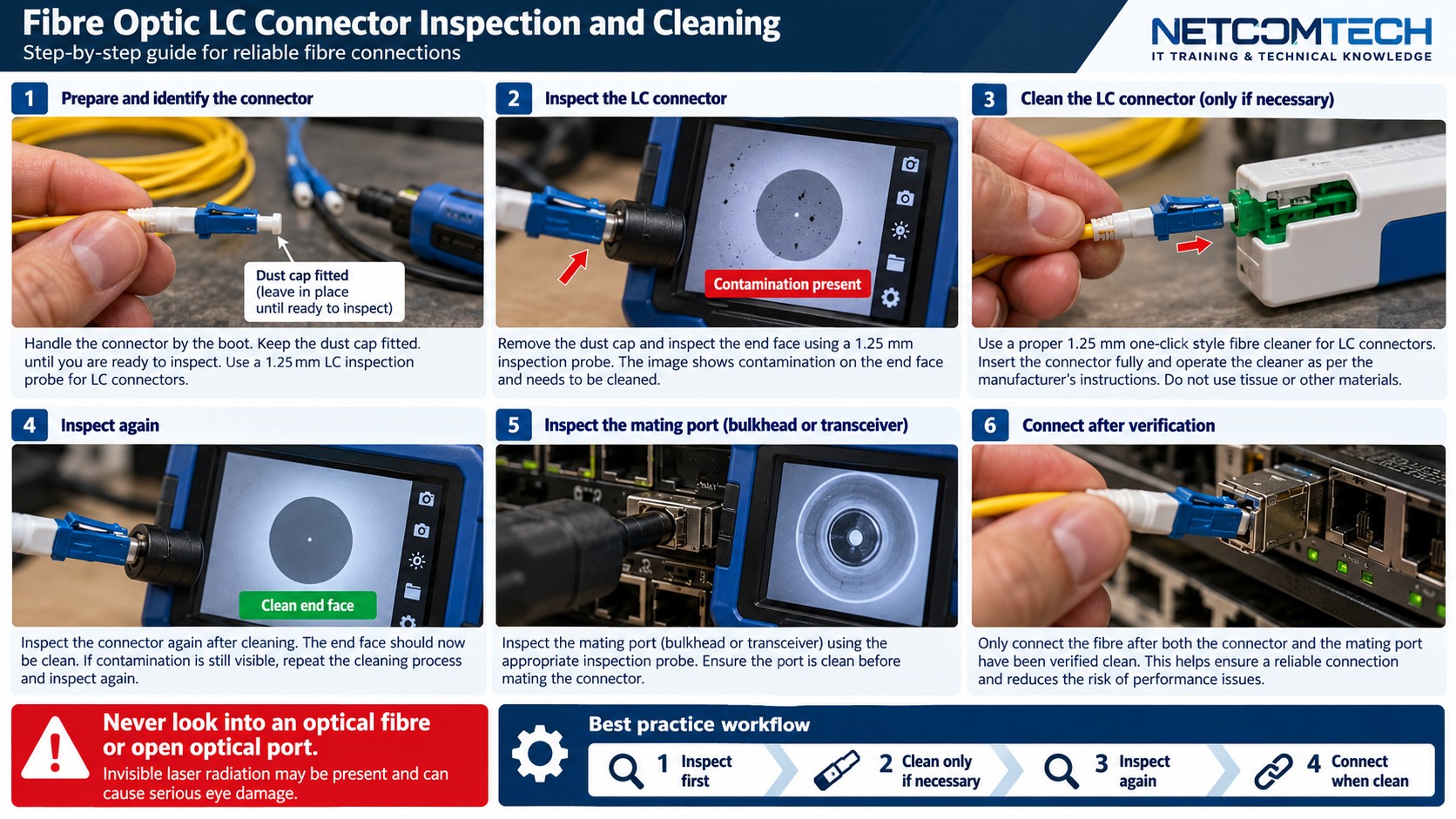
Fluke notes that contaminated fibre connections remain a leading cause of fibre problems and test failures. A small particle can affect loss and reflection.
2. Inspect before mating
Inspect accessible end faces before connecting, including new patch cords and test reference cords. A dust cap is not proof of cleanliness.
3. Clean with the correct method
Use tools and solvents intended for fibre connectors and follow the equipment procedure. Avoid touching the ferrule end face.
4. Inspect again
Cleaning without reinspection leaves you guessing whether contamination moved or was removed. The workflow is inspect, clean if necessary, inspect again, then connect.
5. Protect adapters and test ports
Test equipment adapters and bulkheads can transfer contamination. Include them in the inspection routine.
6. Do not repeatedly reconnect a dirty interface
Every mating can transfer contamination to the other side. Stop and inspect rather than cycling connectors hoping the link improves.
7. Use loss evidence
After cleaning, compare OLTS/DOM/OTDR evidence as appropriate. Cleaning should not be used to hide a damaged connector or bad splice.
8. Acceptance
Record that end faces were inspected, then save the actual optical test results required by the project. Cleanliness is part of workmanship; measured performance is the acceptance evidence.
Worked field scenario
A new LC patch lead is removed from a sealed bag and immediately connected, but the link shows high loss. New does not mean inspected. Inspect both end faces, clean if needed, inspect again, then repeat the optical measurement before replacing optics.
Do not proceed from a product label alone. Convert the requirement into measurable compatibility, capacity, installation and acceptance checks.
Procurement questions before ordering
The ordering stage is where many field problems are created. Capture the following before selecting the exact product:
- OS2/OM fibre type and strand count
- Connector and polish at every interface
- Optic wavelength and supported reach
- Expected loss budget and test method
- Patch-panel, splice and polarity plan
Where a manufacturer compatibility list, rail matrix, supported-optics table or battery cartridge reference exists, record the exact source used for the decision. That gives the later installer evidence rather than a verbal assumption.
Fault-finding decision path
Inspect and clean before deeper troubleshooting. Then verify optic recognition, Tx/Rx pairing and polarity. Use DOM as live equipment evidence, OLTS for end-to-end insertion loss and OTDR when event location or characterisation is needed. Keep the design loss budget beside the measurements.
Keep a simple change log while troubleshooting: observation, action, result. If a change does not alter the symptom, put the system back unless there is a documented reason to retain it. This prevents troubleshooting from becoming an uncontrolled configuration drift.
Common mistakes that create repeat faults
Do not look into live fibre. Do not mate APC and UPC interfaces. Do not assume a dust cap means clean, and do not use an OTDR trace alone as a substitute for insertion-loss acceptance when the project requires OLTS testing.
A technically successful installation can still be a poor operational result if the next technician cannot identify what was installed, why it was selected, or how it was tested. Serviceability is part of infrastructure quality.
Acceptance and handover evidence
Provide fibre IDs, route, fibre type, connector/polish, splice locations, optic types and measured results. Store original OLTS/OTDR result files where possible so future technicians can compare traces and losses rather than relying on screenshots.
Use filenames, labels and port/bay identifiers that match the physical installation. Handover evidence should let someone who was not present at the installation verify the final state and repeat the important tests later.
RELATED HARDWARE
Apply the lesson to Server Warehouse
These are educational category relationships. Always verify exact model compatibility, firmware, electrical limits, supported media and manufacturer requirements before ordering.
Technical references
Manufacturer documentation and the project specification remain authoritative for model-specific limits, procedures and safety requirements.